Designing Safe Auto-Cleanup and Trash for a Local-First Notes App
Designing Safe Auto-Cleanup and Trash for a Local-First Notes App
Local-first software earns trust by keeping user data on the device. That promise, however, makes deletion design more important—not less. If a cloud service deletes the wrong record, a server backup may exist. If a browser extension permanently removes a note from chrome.storage.local, there may be no second copy.
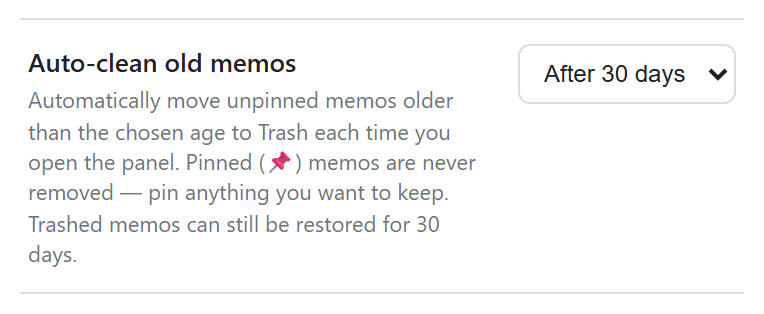
This article explains the design behind Auto-clean and Trash in Simple Side Note. The implementation uses three safety layers: cleanup is opt-in, important notes are excluded, and expired notes move to a recoverable trash area before permanent deletion.
Start with explicit product invariants
Before writing cleanup code, define rules that must always remain true. These are more useful than a list of UI controls because they can become test cases.
For this note app, the invariants are:
- Auto-clean is off by default.
- Only unpinned notes can expire.
- The note currently being edited cannot be cleaned.
- Cleanup moves a note to Trash; it does not erase it immediately.
- A trashed note remains recoverable for 30 days.
- Restoring a note never silently overwrites another note.
- Pinned notes remain until the user explicitly deletes them.
The distinction between “old” and “safe to remove” matters. A two-year-old pinned reference can be valuable, while a seven-day-old scratch note may be disposable. Age is only one input to the policy.
Keep the setting opt-in
An automatic deletion feature should not surprise existing users after an update. Store an explicit cleanup interval and treat missing or disabled values as off.
const CLEANUP_OPTIONS = new Set([7, 30, 90]);

function normalizeCleanupDays(value) {
  const days = Number(value);
  return CLEANUP_OPTIONS.has(days) ? days : 0;
}
Here, 0 means disabled. This also provides a migration fallback: users upgrading from an older version have no setting, so normalization produces 0 rather than unexpectedly deleting notes.
The UI should describe the consequence, not just the interval. “Move unpinned notes older than 30 days to Trash” is clearer than “30-day cleanup.” It tells users which notes are affected and where they go.
Separate active notes from trash records
A note can remain mostly unchanged when it enters Trash. Add a timestamp that records when the transition happened.
function moveToTrash(note, now = Date.now()) {
  return {
    ...note,
    trashedAt: now
  };
}
Do not use updatedAt as the trash retention clock. A note may have been edited months ago but deleted today; it should still receive the full recovery window. trashedAt represents a different event and deserves its own field.
A compact storage shape could look like this:
{
  notes: [/* active notes */],
  trash: [/* notes with trashedAt */],
  settings: { autoCleanupDays: 30 }
}
Keeping active and deleted collections separate makes the normal note list simpler and prevents accidental search results or exports from including deleted content.
Implement cleanup as a partition
Rather than mutating the note array while iterating, classify each note and build new collections. The function should protect pinned notes and the current editing target before checking age.
function applyAutoCleanup(notes, trash, options) {
  const { cleanupDays, currentNoteId, now = Date.now() } = options;
  if (!cleanupDays) return { notes, trash, moved: 0 };

  const cutoff = now - cleanupDays * 24 * 60 * 60 * 1000;
  const kept = [];
  const moved = [];

  for (const note of notes) {
    const protectedNote = note.pinned || note.id === currentNoteId;
    const expired = Number(note.updatedAt) < cutoff;

    if (!protectedNote && expired) {
      moved.push({ ...note, trashedAt: now });
    } else {
      kept.push(note);
    }
  }

  return {
    notes: kept,
    trash: [...trash, ...moved],
    moved: moved.length
  };
}
This function is deterministic when now is provided, which makes boundary tests easy. A note updated exactly at the cutoff can be defined as retained or expired, but the comparison must be intentional and tested.
Protecting the current note avoids a subtle failure: the panel opens an old note, startup cleanup runs, and the Save button later recreates a partial or duplicate record. The editing session is part of the data model even if it is only represented by an ID in memory.
Purge Trash with a different clock
Auto-clean and Trash retention are two separate jobs. Cleanup checks updatedAt; purging checks trashedAt.
const TRASH_RETENTION_DAYS = 30;

function purgeExpiredTrash(trash, now = Date.now()) {
  const cutoff = now - TRASH_RETENTION_DAYS * 24 * 60 * 60 * 1000;
  return trash.filter((note) => {
    const trashedAt = Number(note.trashedAt);
    return Number.isFinite(trashedAt) && trashedAt >= cutoff;
  });
}
Legacy or malformed records need an explicit policy. The conservative choice is to retain records with an invalid timestamp and repair them, rather than permanently deleting them. Production code can assign a migration timestamp when it first discovers an old trash record.
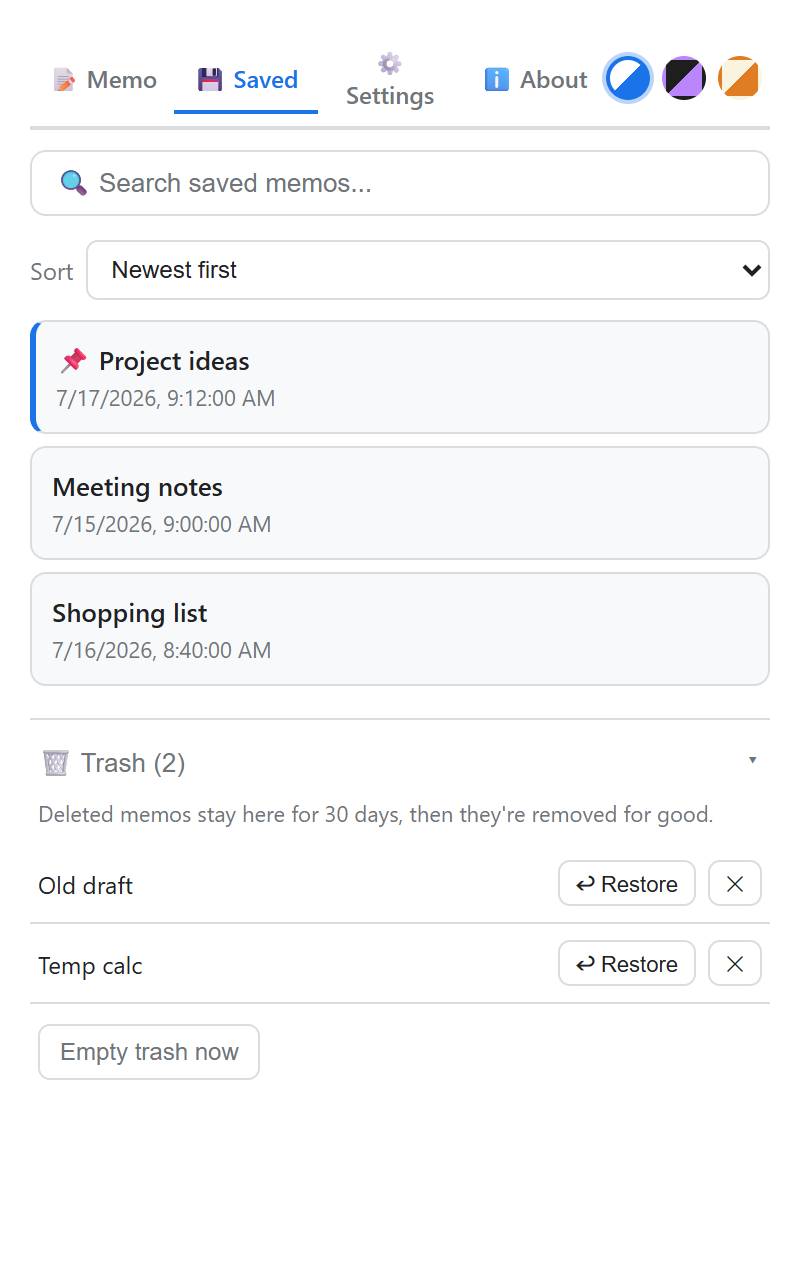
The Trash screen should display the remaining recovery period, offer Restore, and reserve permanent deletion for a separate confirmed action. “Empty Trash” deserves stronger confirmation than moving one note into Trash because its impact is broad and irreversible.
Restore without overwriting
Restoring appears simple until an active note already uses the same ID. That can happen after import, manual storage repair, or a historical bug. Never replace the active note silently.
function restoreNote(note, activeNotes, createId) {
  const collision = activeNotes.some((item) => item.id === note.id);
  const restored = {
    ...note,
    id: collision ? createId() : note.id
  };

  delete restored.trashedAt;
  return restored;
}
The title may optionally receive “(Restored)” when an ID collision occurs, but changing the ID is the essential safety step. Preserve the note body and original timestamps unless the interface clearly communicates a different policy.
Commit related changes together
With chrome.storage.local, write the new active and trash arrays in one call. This narrows the chance of persisting only half of a transition.
const result = applyAutoCleanup(notes, trash, {
  cleanupDays,
  currentNoteId,
  now: Date.now()
});

await chrome.storage.local.set({
  notes: result.notes,
  trash: result.trash
});
Browser storage is not a relational database transaction, so code should also avoid overlapping cleanup runs. A simple in-flight promise or startup coordinator can ensure that cleanup, import, and manual deletion do not write competing snapshots.
For larger datasets, quota errors must be handled visibly. Moving an image-heavy note to Trash does not reduce storage usage because the content still exists. Cleanup is an organization feature, not a storage-space guarantee, until Trash is purged.
Test time and failure paths
Time-based features become reliable when the clock is injected instead of read everywhere. Use fixed timestamps and test both sides of every threshold.
High-value tests include:
- Missing cleanup settings leave every note untouched.
- Pinned notes survive all cleanup intervals.
- The current unpinned note survives even when old.
- Eligible notes move to Trash with the same content and a new
trashedAt. - A 29-day-old trash item remains, while an item beyond 30 days is purged.
- Restore removes
trashedAtand handles duplicate IDs. - A failed storage write leaves the in-memory UI able to reload the prior saved state.
- Imported notes with missing timestamps follow a conservative migration rule.
Also test the user journey: enable a seven-day policy, pin one old note, leave another unpinned, restart the extension, restore the moved note, and then disable cleanup. Unit tests protect logic; this scenario protects the product experience.
Privacy requires recoverability
A local-first app should not send note contents to a server merely to implement Trash. Recovery can remain entirely on-device in chrome.storage.local, and backup/export can give users a second layer of control.
Privacy messaging should still be precise. “Stored locally” does not mean “impossible to lose.” Removing the extension, clearing browser data, device failure, or permanently emptying Trash can destroy local data. A good settings screen pairs privacy with an accessible backup function instead of making an absolute safety claim.
Conclusion
Safe cleanup is a lifecycle, not a timer followed by delete. The system needs an opt-in policy, protected records, a move-to-trash transition, an independent retention clock, collision-safe restore, and tests around time boundaries.
These choices add a little code but remove the most dangerous surprise in a note-taking app: losing information without a clear action or a path back. In local-first software, recoverability is part of privacy and part of user trust.


Comments
Post a Comment